
Unity) Coroutine (코루틴)

Coroutine (코루틴) 이란?
해당 메서드 내의 실행을 중단하고 원하는 타이밍, 시간 후에 중단한 시점부터 이어서 진행할 수 있도록 도와주는 함수입니다.
- 코루틴은 비동기처럼 동작하지만 동기로 동작한다.
csharp
private IEnumerator MyRoutine()
{
    yield return null;
}
- 함수의 반환형은 ==IEnumerator==
- 반환할때는 ==yield return==
**yield return ***** > *** 가 충족되는 상황까지 함수를 중단하고 대기할 것 - ==yield break== : 루틴을 아예 멈출 때 사용합니다.
- 코루틴 시작 : ==StartCoroutine==( 시작할 코루틴 메서드 );
- 코루틴 종료 : ==StopCoroutine==( 종료할 코루틴 메서드 );
1-1) yield 의 종류
- ==yield null==
-> 다음 프레임까지 기다립니다.
2. ==yield WaitForSeconds==
-> 주어진 시간만큼 기다립니다. ==new==로 만들어야합니다.
3. ==yield WaitForFixedUpdate==
-> 모든 스크립트의 FixedUpdate가 불릴 때까지 기다립니다.
4. ==yield WaitUntil==
-> 안에 들어있는 조건이 참이 될 때까지 기다립니다.
5. ==yield WaitWhile==
-> 안에 들어있는 조건이 거짓이 될 때까지 기다립니다.
yield return 뒤 | 무엇을 기다리나 | 언제 이어지나 | 쓰는 자리 |
|---|---|---|---|
null | 다음 프레임 | 다음 프레임 | 매 프레임 조금씩 하는 일 |
new WaitForSeconds(초) | 주어진 시간 | 그 시간이 지난 뒤 처음 오는 프레임 | 정해진 간격을 두는 일 |
new WaitUntil(조건) | 조건이 참이 되는 것 | 조건이 참으로 확인된 프레임 | 무언가 갖춰질 때까지 기다리는 일 |
1-2) yield return 라이프사이클 관련
==++Coroutine++== 은 결론적으로 비동기가 아니기 때문에 Unity의 라이프사이클 내에서 동작한다.
==Coroutine==은 Update 가 끝난 후에 이어집니다.
chsarp
private void Start()
{
    Debug.Log("Start 시작");
    StartCoroutine(MyRoutine());
    Debug.Log("Start 종료");
}
private void Update()
{
    Debug.Log("Update");
}
private void LateUpdate()
{
    Debug.Log("--LateUpdate--");
}
private IEnumerator MyRoutine()
{
    while (true)
    {
        yield return new WaitForSeconds(0.1f);
        Debug.Log("Coroutine");
    }
}
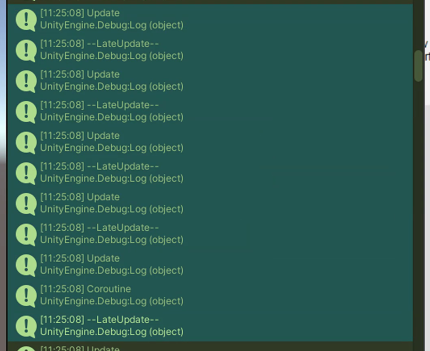
csharp
private void Start()
{
    Debug.Log("Start 시작");
    StartCoroutine(MyRoutine());
    Debug.Log("Start 종료");
}

private IEnumerator MyRoutine()
{
    Debug.Log("Coroutine 1");
    yield return new WaitForSeconds(1f);
    Debug.Log("Coroutine 2");
    yield return new WaitForSeconds(1f);
    Debug.Log("Coroutine 3");
    yield return new WaitForSeconds(1f);
    Debug.Log("Coroutine 4");
    yield return new WaitForSeconds(1f);
    Debug.Log("Coroutine 5");
}
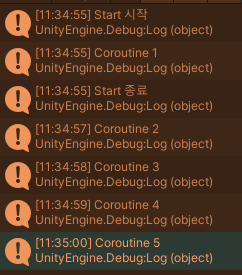
csharp
using System.Collections;
using UnityEngine;

public class FrameStepper : MonoBehaviour
{
    private const int UPDATE_LOG_LIMIT = 4;

    private int _updateCount;

    private void Start()
    {
        StartCoroutine(StepRoutine());
    }

    private void Update()
    {
        LogFirstUpdates();
    }

    private IEnumerator StepRoutine()
    {
        Debug.Log("FrameStepper: 코루틴 첫째 줄");
        yield return null;
        Debug.Log("FrameStepper: 코루틴 둘째 줄");
        yield return null;
        Debug.Log("FrameStepper: 코루틴 셋째 줄");
    }

    private void LogFirstUpdates()
    {
        if (_updateCount >= UPDATE_LOG_LIMIT)
        {
            return;
        }

        _updateCount++;
        Debug.Log($"FrameStepper: Update {_updateCount}번째");
    }
}
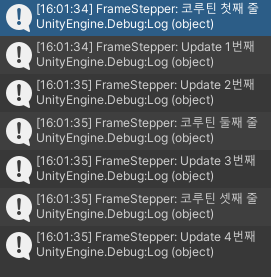
- Update 1,2번째가 연속으로 나오는 이유는 코루틴은 Update 후에 동작하기 때문입니다.
1-3) 코루틴 사용 시 주의점
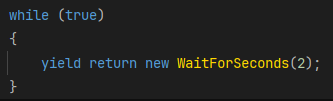
- 위와 같이 사용하게 되면 ==WaitForSeconds==가 클래스이기 때문에
클래스 인스턴스를 계속 생성하게 되어 많은 양의 가비지가 발생할 수도 있다.
1-3의 해결법
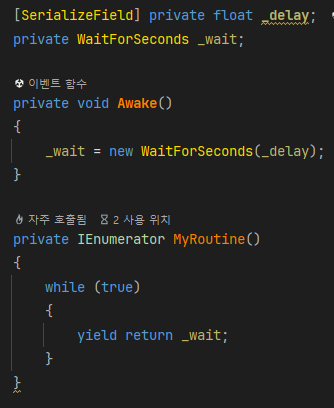
- 미리 WaitForSeconds 를 캐싱해놓고 해당 변수를 재사용하는 식으로 사용하는 것을 추천한다.
1-4) WaitForSecondsRealtime
Unity에는 ==Time.timeScale== 이라는 게임 속 시간이 어떤 속도로 흘러갈 것인지 설정할 수 있는 기능이 있는데
==WaitForSeconds== 는 게임 속에 반영된 시간을 기다리고,
==WaitForSecondsRealtime==은 게임 외부의 실제 시간을 기다리게 됩니다.
1-5) WaitUntil
넘긴 조건이 참이 될 때까지 기다립니다.
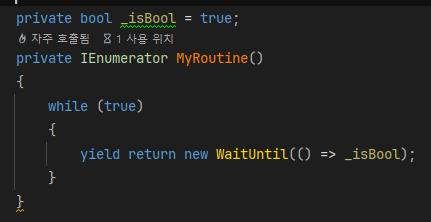
- 이 조건은 람다식 ( => ) 오른쪽에 있는 조건문이 참이 될때까지 매 프레임 확인되기 때문에
무거운 계산을 넣게되면 그 계산이 매 프레임 돌게 됩니다.