
프로그래밍 언어 - C#(3) 배열과 반복문
1. 발표 자
1.1. float가 같다가 안된다? - 부동소수점
- CPU는 어느 정도의 소수점 자리에서 반올림하여 인식한다.

<미세 소수점으로 인해 정확한 값에 맞지 않는다>
- 그래서 미세 소수점이 다르므로 같지 않게 되어버림.
- 두가지 방식이 있는데 고정 소수점과 부동 소수점이 존재. 소수점의 위치를 옮길 수 있느냐 마느냐의 차이이다.
- 부동 소수점은 위치를 저장해야 함.
- 표준 상에서는 가장 상단 bit에는 부호고 8bit는 지수, 남은 23 bit는 가수가 된다.
- 정해진 규칙은 존재. 일반적으로 지수 상에서 0000_0000이면 0, 1111_1111이면 무한.
- 지수는 무한인데 가수에 무한대가 나타낸 것이 아니면 NaN(Not at Number)가 도출.
- 결국 가수의 끝에서 반올림을 하기 때문에 근사값이지 정확한 값이 아니게 된다.
2. 배열
2.1. 개요
- 가령 던전에 몬스터가 100기면 일일이 하나씩 선언하지 않을 것이다.
- 그것을 묶어서 한번에 선언하는 것을 배열이라고 한다.

<하나씩만 선언해서 처리하는 것은 비효율이기 때문에>
- 여러 데이터를 한 번에 다루는 것은 배열만이 있는 것이 아니다.
- 일단 배열은 여러 데이터를 한 번에 담아서 다룰 수 있다 정도만 인지할 것.
- 배열은 모든 요소가 같은 형식이어야 하며(int만, float만 등) 연속된 공간이 부여된다.
- 공간 크기를 바꾸면 거의 고정이라고 생각해야 한다. 물론 바꿀 수 있긴 하지만 새 배열을 다시 선언해서 옮겨야 하는 형태로 이루어진다.
- 데이터 타입에서 값과 참조 타입이 존재했었는데 배열은 C#에서는 참조 타입이다(C++에서는 다르겠지만).
- 오늘은 사용 위주로 진행할 예정.
2.2. 배열 선언
csharp
using System;

class Program
{
    public static void Main(string[] args)
    {
        // 일반적인 변수 선언.
        // int number;
        // 배열 선언
        int[] numbers; // type[] name;
    }
}
- 위와 같은 형식으로 선언이 이루어진다. 아래는 자유롭게 선언한 사항.
csharp
using System;

class Program
{
    public static void Main(string[] args)
    {
        // 일반적인 변수 선언.
        // int number;
        // 배열 선언
        int[] numbers; // type[] name;
        float[] a;
        string[] b;
    }
}
- 이제 배열로 접근해서 실제로 접근해볼 것이다.
csharp
using System;

class Program
{
    public static void Main(string[] args)
    {
        // 일반적인 변수 선언.
        // int number;
        // 배열 선언 : type[] name;
        int[] numbers = { 1, 5, 7, 3, 9 };
    }
}
csharp
using System;

class Program
{
    public static void Main(string[] args)
    {
        // 일반적인 변수 선언.
        // int number;
        // 배열 선언 : type[] name;
        int[] numbers = { 1, 5, 7, 3, 9 };

        Console.WriteLine(numbers[0]);
        Console.WriteLine(numbers[1]);
        Console.WriteLine(numbers[2]);
        Console.WriteLine(numbers[3]);
        Console.WriteLine(numbers[4]);
    }
}
- 배열 하나하나에 들어있는 데이터를 원소라고 부른다.
- 배열에서 접근을 위해 index로 접근하는데 번호표라고 해야 한다.

<로또도 1번에서 45번까지 있는 배열에서 뽑는 것이다>
csharp
using System;

class Program
{
    public static void Main(string[] args)
    {
        // 일반적인 변수 선언.
        // int number;
        // 배열 선언 : type[] name;
        int[] numbers = { 1, 5, 7, 3, 9 };

        Console.WriteLine(numbers[0]);
        Console.WriteLine(numbers[1]);
        Console.WriteLine(numbers[2]);
        Console.WriteLine(numbers[3]);
        Console.WriteLine(numbers[4]);

        numbers[2] = 99;
        Console.WriteLine(numbers[2]);
    }
}
- 물론 이렇게 index로 접근해서 원소를 바꿀 수 있다.
- 핵심은 공통된 데이터 형 여러개를 다룰 수 있다는 것이다.
- 현재 배열은 원소가 5개가 있다. 그러면 index를 5번 또는 -1로 접근하면 어찌 될까? 결론은 터지게 된다.
- 원인은 범위 밖으로 index가 벗어난 수를 했기 때문.
csharp
using System;

class Program
{
    public static void Main(string[] args)
    {
        // 일반적인 변수 선언.
        // int number;
        // 배열 선언 : type[] name;
        int[] numbers = { 1, 5, 7, 3, 9 };

        Console.WriteLine(numbers[0]);
        Console.WriteLine(numbers[1]);
        Console.WriteLine(numbers[2]);
        Console.WriteLine(numbers[3]);
        Console.WriteLine(numbers[4]);

        numbers[2] = 99;
        Console.WriteLine(numbers[2]);

        Console.WriteLine(numbers[5]);
        Console.WriteLine(numbers[-1]);
    }
}
- 프로그램이 돌아가는 중에 데이터를 입출을 할 수 있다.
- 미리 배열 크기를 지정하겠다고 할 수 있다.
csharp
using System;

class Program
{
    public static void Main(string[] args)
    {
        // 메모리에 5칸짜리 배열을 할당한다는 의미.
        int[] numbers = new int[5];
    }
}
- 배열의 크기를 뽑아 내는 것을 생각해야 할 수 있다.
csharp
using System;

class Program
{
    public static void Main(string[] args)
    {
        int arSize = 10;

        // 일반적인 변수 선언.
        // int number;
        // 배열 선언 : type[] name;
        // int[] numbers = { 1, 5, 7, 3, 9 };
        // int[] numbers = new int[] {1, 5, 7, 3, 9};
        int[] numbers = new int[5]; // 메모리에 5칸짜리 배열을 할당한다는 의미.
    }
}
- 그 때 사용하는 것이 Length.
csharp
using System;

class Program
{
    public static void Main(string[] args)
    {
        int arSize = 10;

        // 일반적인 변수 선언.
        // int number;
        // 배열 선언 : type[] name;
        // int[] numbers = { 1, 5, 7, 3, 9 };
        // int[] numbers = new int[] {1, 5, 7, 3, 9};
        int[] numbers = new int[arSize / 2];

        Console.WriteLine(numbers.Length);
    }
}
2.3. 다차원 배열
- 기본적인 배열은 1차원 배열이다. 쭉 늘어진 형태.
- 2차원 배열을 살펴보려면 Grid 형태가 적합.
- 보통 인벤토리에 자주 사용되는 것이 이 2차원 배열이다.
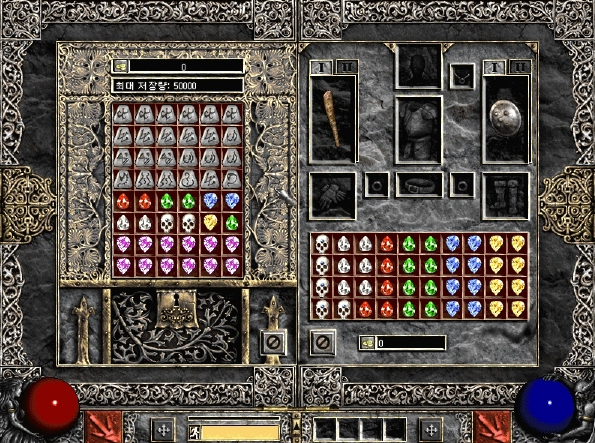
<와 2차원 배열! 와 그리드!>
csharp
using System;

class Program
{
    public static void Main(string[] args)
    {
        // 2차원 배열의 형태
        int[,] matrix;
    }
}
- 다음과 같이 할당 가능하다.
csharp
using System;

class Program
{
    public static void Main(string[] args)
    {
        int arSize = 3;

        // 2차원 배열의 형태
        int[,] matrix = new int[arSize, arSize];
    }
}
- 이런 형태도 가능하다.
csharp
using System;

class Program
{
    public static void Main(string[] args)
    {
        int arSize = 3;

        // 다른 형태로의 선언
        int[,] matrix =
        {
            { 1, 2, 3 },
            { 4, 5, 6 },
            { 7, 8, 9 }
        };
    }
}
- 가시적으로는 바둑판 형태로 배치된다고 생각할 수 있겠지만 메모리에 그냥 일렬로 쭉 배치된다. 그냥 1차원 배열과 다를 것이 없음.
- 단, index로 접근할 때 index 연산을 통해 끊어서 갈 수야 있다.
- 접근은 다음과 같다.
csharp
using System;

class Program
{
    public static void Main(string[] args)
    {
        int arSize = 3;

        // 다른 형태로의 선언
        int[,] matrix =
        {
            { 1, 2, 3, 4, 5, 6, 7, 8, 9, 10 },
            { 11, 12, 13, 14, 15, 16, 17, 18, 19, 20},
            { 21, 22, 23, 24, 25, 26, 27, 28, 29, 30 },
            { 31, 32, 33, 34, 35, 36, 37, 38, 39, 40 },
            { 41, 42, 43, 44, 45, 46, 47, 48, 49, 50 }
        };

        Console.WriteLine(matrix[3, 7]);
    }
}
- 좌표는 큰 단위로 어떤 곳의 몇번째 index인지 이런 느낌이다.
- 뒤 쪽이 가장 작은 단위구나라고 이해를 하면 쉬움.
- 보통 게임에서 2차원 배열까지는 활발하게 사용하지만 3차원까지 쓸 일이 그렇게 많이 있지는 않다.
2.4. 가변 배열
- 효과적인 설명을 위해서는 참조가 필요하다.
- 참조 개념이 나온 다음에 확인하기로 한다.
2.5. 이전에 다뤘던 사항을 응용한 것
- 대표적으로 문자열이 이에 해당한다.
- 캐릭터는 문자 하나만을 위한 자료형. 그렇지만 string은 문자 하나하나 모여서 만들어진 배열의 형태가 내부적으로 갖춰진 것.
csharp
using System;

class Program
{
    public static void Main(string[] args)
    {
        string text="Hello World";
        Console.WriteLine(text[1]);
    }
}
- 특정 문자를 고치고 싶다면 어떻게 해야 할까? 이럴 때는 새로운 문자열을 만들어야 한다.
- 다음과 같이 해보도록 한다.
csharp
using System;

class Program
{
    public static void Main(string[] args)
    {
        string text="Hello World";
        // text[1] = 'E'; 불가.

        char[] changeChar=text.ToCharArray(); // 보편적으로 사용되는 것.
        changeChar[1] = 'E';

        // 메모리에 새로 만듦. changeChar를 사용해서.
        string newText = new string(changeChar);

        Console.WriteLine(newText);
    }
}
- 이젠 유저의 입력값을 받아서 처리를 해볼 수 있게 되었다.
- 콘솔에서 쓰는 기능은 WriteLine 등이 해당이 될탠데 이것의 반대를 생각해보면 된다.
csharp
using System;

class Program
{
    public static void Main(string[] args)
    {
        string input = Console.ReadLine();

        Console.WriteLine($"유저 입력 : {input}");
    }
}
- 이렇게 입력까지 확인이 된다.
- 하나의 문자열을 받아서 사용해야 하는 케이스가 존재할 수 있는데 다음 코드를 보도록 하자.
csharp
using System;

class Program
{
    public static void Main(string[] args)
    {
        string userInput = Console.ReadLine();
        string[] inputs = userInput.Split(' '); // 자를 것. 띄어쓰기 한 칸 기준으로

        Console.WriteLine($"유저 입력 1: {inputs[0]}");
        Console.WriteLine($"유저 입력 2: {inputs[1]}");
        Console.WriteLine($"유저 입력 3: {inputs[2]}");
    }
}
- 여기서 숫자 변환을 시행해보도록 하자.
csharp
using System;

class Program
{
    public static void Main(string[] args)
    {
        string userInput = Console.ReadLine();
        string[] inputs = userInput.Split(' '); // 자를 것. 띄어쓰기 한 칸 기준으로

        int[] numbers = new int[3];
        numbers[0] = int.Parse(inputs[0]);
        numbers[1] = int.Parse(inputs[1]);
        numbers[2] = int.Parse(inputs[2]);

        int result = numbers[0] + numbers[1] + numbers[2];

        Console.WriteLine(result);
    }
}
- 이렇게 변환하여 입력받아서 처리가 가능하다.
- 이번에는 방어적 코딩에 대해 보도록 하자.
csharp
using System;

class Program
{
    public static void Main(string[] args)
    {
        string userInput=Console.ReadLine();
        int number;

        if (int.TryParse(userInput, out number))
        {
            Console.WriteLine("변환 완료");
        }
        else
        {
            Console.WriteLine("변환 실패");
        }
    }
}
- 모양이 크게 다르진 않지만 'int.TryParse(userInput, out number)'라는 것이 나옴.
- 이런 식으로 오기입을 방어하는 방식이 존재한다.
- if 안쪽에 기능이 들어갔으면 이 기능이 결과적으로 bool 타입으로 반환한다. 조건식을 선언하는 것이 아니라 bool 타입 안에다가 만들어서 반환하게 만들 수 있다.
csharp
using System;

class Program
{
    public static void Main(string[] args)
    {
        string userInput=Console.ReadLine();
        int number;

        bool isSuccess=int.TryParse(userInput, out number);

        if (isSuccess)
        {
            Console.WriteLine("변환 완료");
        }
        else
        {
            Console.WriteLine("변환 실패");
        }
    }
}
3. 반복문
3.1. 개요
- 로직들이 현재까진 직관적이었다면 반복문은 루프를 반복하다가 넘어간다.
- 이럴 때 필요한 것은 낙서이다.
- 조건이 참이면 코드 실행을 반복하다가 조건이 거짓일 때 루프를 벗어날 수 있다.

<거짓 조건이 없으면 영원히 루프에 묶이게 된다>
3.2. while문
- 먼저 코드부터 보자.
csharp
using System;

class Program
{
    public static void Main(string[] args)
    {
        // while 문
        while (true)
        {
            Console.Write("반복중..");
        }
    }
}
- 이 코드는 무한히 반복한다.
- 가끔 while같은 경우에는 무한 반복을 의도적으로 거는 경우도 있다.
- 게임 화면이 움직인다는 것처럼 보이는 것이 한 프레임 찍고 다른 한 프레임을 찍고 하는 것들이 반복하는 결과이다.
- 내부 어딘가에선 while이 돌아간다. 하지만 이것은 게임 엔진에서는 신경쓰지 않을 정도로 포장이 된 것일 뿐.
- 내가 원하는 타이밍까지 반복시키고 싶을 때 쓴다.
- 그럼 원하는 횟수만큼 반복시키고 싶다면 어떻게 해야할까?
- 코드를 보자.
csharp
using System;

class Program
{
    public static void Main(string[] args)
    {
        // while 문
        int count = 0;

        while (count < 3) // count 1 / count 2 / count 3까지 간 후 루프를 벗어남.
        {
            count++;
            Console.Write("반복중..");
        }

        Console.WriteLine("끝.");
    }
}
- 사이클 분기 때 낙서하면서 보면 좀 보기 쉬워진다.
- 아무튼 거짓이 되는 구간을 만들어 놓으면 루프 탈출 가능.
- 이번엔 비틀어서 진행해보도록 하자. 조건을 걸어보는 것으로.
csharp
using System;

class Program
{
    public static void Main(string[] args)
    {
        // while 문
        int count = 0;

        while (count <= 100)
        {
            count++;
            if(count % 2 == 0)
            {
                Console.WriteLine($"현재 숫자 : {count}");
            }
        }

        Console.WriteLine("끝.");
    }
}
- 이렇게 짝수일때만 출력되는 것들을 알 수 있다.
- 루프를 몇번 출력했는지를 확인해볼 것도 추가해보자.
csharp
using System;

class Program
{
    public static void Main(string[] args)
    {
        // while 문
        int count = 0;

        while (count <= 100)
        {
            count++;
            if(count % 2 == 0)
            {
                Console.WriteLine($"현재 숫자 : {count}");
            }

            Console.WriteLine($"루프 {count}번째");
        }

        Console.WriteLine("끝.");
    }
}
- 이번엔 좀 더 조건을 걸어보자.
csharp
using System;

class Program
{
    public static void Main(string[] args)
    {
        // while 문
        int count = 0;

        while (count <= 100)
        {
            count++;
            if(count % 2 == 0)
            {
                Console.WriteLine($"현재 숫자 : {count}");
            }
            if (count % 3 == 0)
            {
                continue; // 루프 스킵하고 다음 루프로 가게 만드는 것.
            }

            Console.WriteLine($"루프 {count}번째");
        }

        Console.WriteLine("끝.");
    }
}
- Continue로 인해 3의 배수일 때는 몇번째 루프인지 출력이 되지 않는다.
- continue같은 경우는 구문 아래의 로직을 스킵하고 다음 루프로 가는 키워드이다.
- 잘못두면 무한루프 돌게 만드는 것이므로 주의.
- 그렇다면 원할 때 반복을 멈추게 하고 싶다면? 게임을 끌 때라던가?
csharp
using System;

class Program
{
    public static void Main(string[] args)
    {
        // while 문
        int count = 0;

        while (count <= 100)
        {
            count++;
            if(count % 2 == 0)
            {
                Console.WriteLine($"현재 숫자 : {count}");
            }

            if (count == 48)
            {
                break;
            }
        }

        Console.WriteLine("끝.");
    }
}
- break를 만나면 반복문을 아예 탈출한다.
- 추가적으로 break 아래에 무언가 있었다면 그것을 처리하지 않고 탈출할 것이다.
3.3. for문
- while문은 count 변수를 만들었어야 한다.
- for문은 단순히 세는 것을 하는 것에 가장 좋다.
- while에서 썼던 것을 for로 옮겨보도록 하자. 구성은 다음과 같다.
csharp
using System;

class Program
{
    public static void Main(string[] args)
    {
        // for 문
        // 구성 : for(초기식; 조건식; 증감식)
        for (int i = 0; i <= 100; i++)
        {
            if(i % 2 == 0)
            {
                Console.WriteLine($"현재 숫자 : {i}");
            }
        }
    }
}
- 순서는 초 > 조 > 증 > 조 > 증 >... 순으로 돌아간다.
- 초기화 한 번한 이후 조건검사를 통해 참이면 루프, 거짓이면 벗어나는 것.
3.4. 이중 반복문
- for문으로 돌려보자.
csharp
using System;

class Program
{
    public static void Main(string[] args)
    {
        for (int i = 0; i < 10; i++)
        {
            for (int j = 0; j < 10; j++)
            {
                Console.WriteLine('♣');
            }
        }
    }
}
- 100개가 출력될 것이다.
- 이중 반복문을 통해 grid를 수행할 수 있다는 이야기.
- 이제 *를 찍어보도록 하자. 하나에서 점점 증가하는 방식의 직각 삼각형을 그려보자.
csharp
using System;

class Program
{
    public static void Main(string[] args)
    {
        string userInput = Console.ReadLine();
        int repeat=int.Parse(userInput);

        for (int i = 0; i < repeat; i++)
        {
            for (int j = 0; j <= i; j++)
            {
                Console.Write("*");
            }
            Console.WriteLine();
        }
    }
}
- 추적을 해보면 (i, j)로 보면 (0, 0)로 시작해서 반복을 돌며 (5, 5)까지 별을 찍게 되는 것이다.
- 다이아몬드, 모래시계 쪽에 관심을 가져볼 것.
- for문의 진가는 배열과 섞어서 쓰면 더욱 발휘된다.(feat. 스플뎀)
4. 혼용
4.1. 예시
- 바로 코드부터 시작.
csharp
using System;

class Program
{
    public static void Main(string[] args)
    {
        // 배열을 반복문으로 순회하기
        string text = "safdsfsdafasDFDADFSADFsdfsafdad";
        int count = 0;

        // 대문자 S 개수 쓰기.
        for (int i = 0; i < text.Length; i++)
        {
            if (text[i] == 'S')
            {
                count++;
            }
        }
        Console.WriteLine(count);
    }
}
- 그렇다면 이제 어제 언급되었던 아스키 코드를 이용해서 변환을 해보도록 하자.
csharp
using System;

class Program
{
    public static void Main(string[] args)
    {
        // 배열을 반복문으로 순회하기
        string text = "safdsfsdafasDFDADFSADFsdfsafdad";

        // 대문자를 모두 소문자로 변환.
        for (int i = 0; i < text.Length; i++)
        {
            // 대문자일 시, 소문자로 바꿔서 한 글자 출력
            if (text[i] < 97)
            {
                Console.Write((char)(text[i] + 32));
            }
            // 소문자일 시, 바로 한 글자 출력
            else
            {
                Console.Write(text[i]);
            }
        }
    }
}
- 이렇게 혼용해서 배열을 사용된다고 보면 된다.